QueueMetrics 26.01
The focus of this release is on the Wallboard, now the beating heart of QueueMetrics. With powerful new filtering capabilities at every level and intuitive supervisor actions, the Wallboard can finally replace all use cases of the legacy Real-Time page. We have also expanded PBX support significantly and continued our modernization efforts to keep QueueMetrics future-proof.
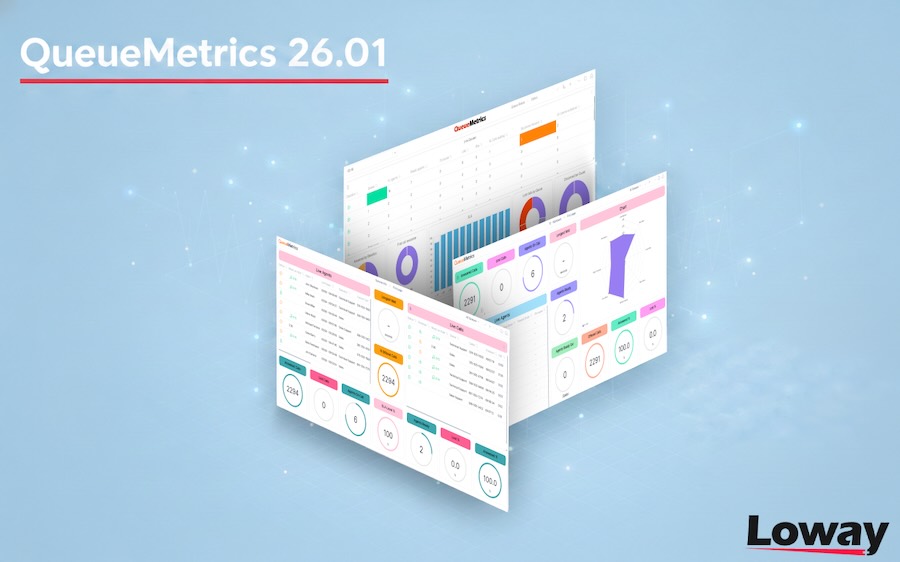
There are also a number of other highlights, as detailed below:
-
Dynamic filters at Wallboard, Page, and Widget levels
-
Easier export jobs and session-based filters for reports
-
Expanded PBX support for FusionPBX, FS PBX, MiRTA PBX, and Microsoft Teams
-
Agent Page enhancements including device selection and automatic log-off
-
Rocky Linux 10 support and official InnoDB database format
-
Last-call deprecation notice for the Icon Agent Page
QueueMetrics 26.01 can now be readily accessed through various means: an RPM package for CentOS 7, Rocky 8, Rocky 9, and Rocky 10 based distributions; an ebuild for Gentoo; a Docker image available on DockerHub; and a TGZ file designed for manual installation on any operating system running the Java platform. Notably, QueueMetrics supports 25 distinct languages/locales, with the recent addition of Thai and Amharic.
If you are not confident in updating on your own, we suggest purchasing a Remote Support Pack so that our own support team can do it for you. Users of our QueueMetrics Live service will have their instance updated automatically.
Wallboard
The Wallboard has become the beating heart of QueueMetrics. Its extensive customization capabilities are highly appreciated for delivering real-time views through dedicated wallboards, serving as a monitoring center for supervisors, or being embedded within the Agent Page for at-a-glance awareness. Thanks to its flexibility, this single tool seamlessly fulfills all three roles.
Filters
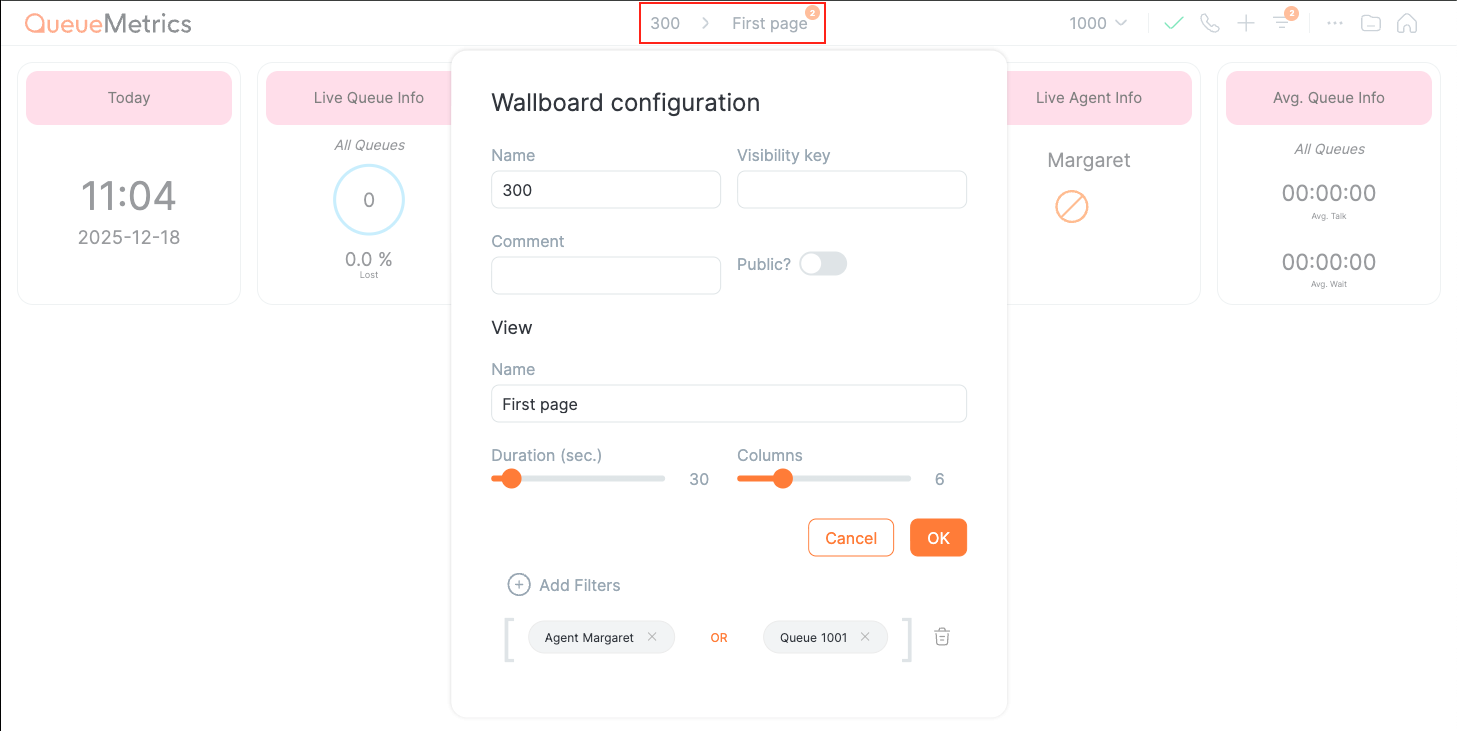
The most requested feature for the Wallboard was the ability to filter data dynamically. Just like reports, applying specific filters allows you to identify a particular set of users or specific calls. Since a Wallboard is composed of multiple pages, and each page contains multiple widgets, version 26.01 introduces filtering at three distinct levels: Wallboard, Page, and Widget. Each level applies an additional filter on top of the previous one.
For example, you can create a single Wallboard that rotates through daily statistics for all queues, then have individual pages for each queue, and within the same page, break down statistics by agent group. The possibilities are truly endless.
Agent Actions
The Wallboard now offers a much more intuitive way for supervisors to perform actions: simply click on an agent without needing to remember their code. The same applies to calls in progress, making supervision faster and more natural.
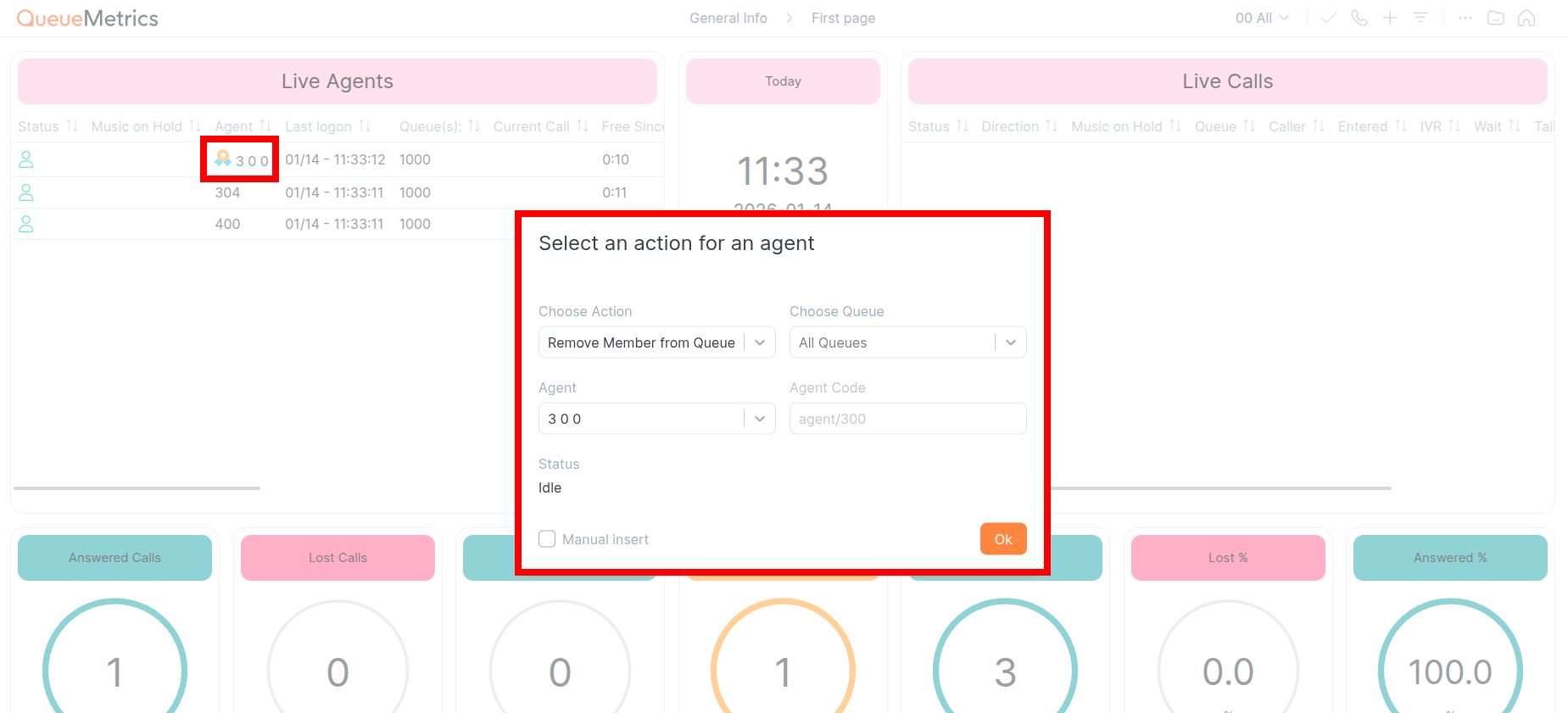
As a result of these changes, the Wallboard now has sufficient functionality and ergonomics to replace all use cases of the legacy Real-Time page. The Real-Time page remains available, but it no longer appears on the home screen of new installations. For those who prefer it, simply add it back from the home page. Nothing changes for existing installations being upgraded.
Reports
Several changes to reports make them easier to use on a daily basis.
Export Jobs
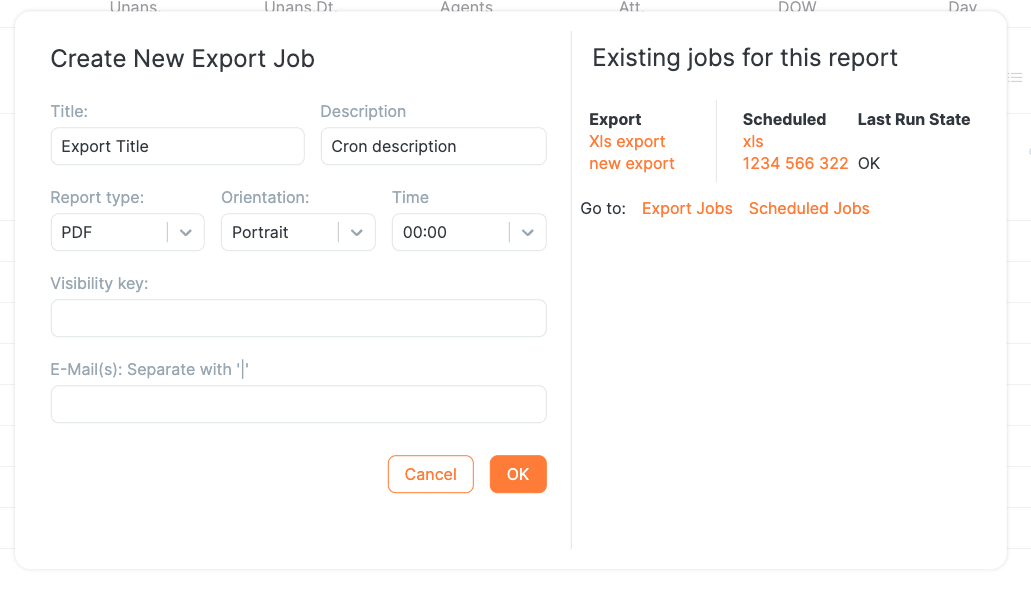
Previously, setting up automated periodic email delivery of reports required creating the report, then creating an export job, and finally creating a scheduled operation to send it. Now this entire workflow can be done directly from within the report interface without opening additional pages. You can also view all export jobs involving the same report in one place.
Session-Based Filters
A significant addition is the introduction of filters based on agent sessions. Until now, all filters in QueueMetrics were tied to specific calls; when an agent had no calls left after filtering, they were removed from the report. With this release, you can filter by specific sessions instead: when a session is excluded, all calls belonging to it are automatically excluded as well. This makes it possible, for example, to search for all calls belonging to very short or very long sessions.
The new session filters include minimum and maximum session duration, minimum and maximum total pause duration, minimum and maximum number of pauses, and hotdesking extension.
Charts
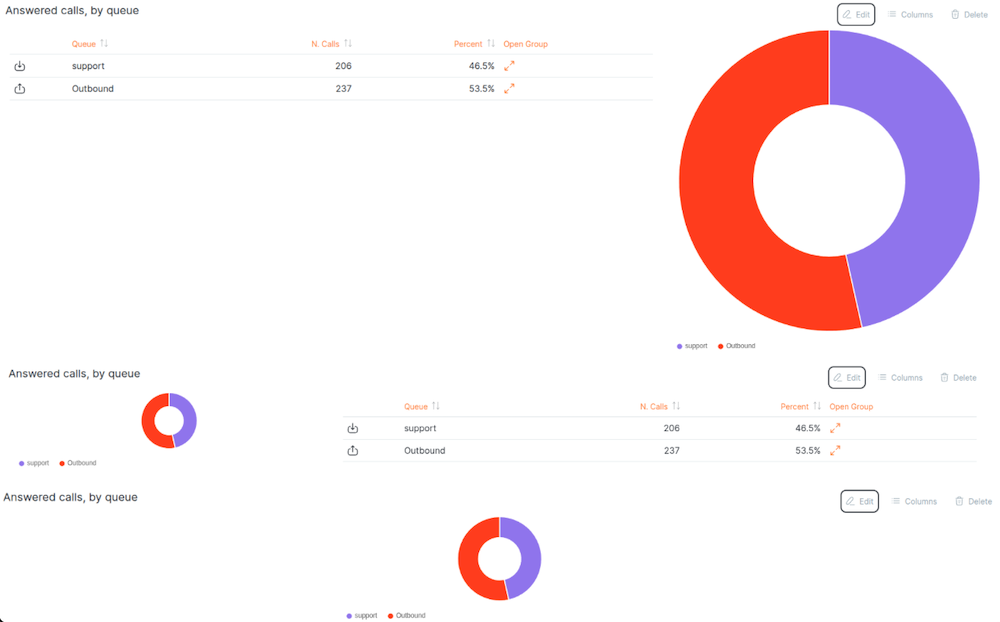
You can now decide the positioning and size of charts to optimize visual space and create more readable, effective report layouts.
No more empty rows in hourly reports
For systems that are not working on a 24h shift, hourly data blocks used to have a set of empty rows before and after the day’s work - usually no calls arrived and no calls were processed between - say - midnight and 7 am. This could be mildly annoying. You can now decide if you want to show or hide them by setting a toogle in the report’s own settings.
PBX Support
We have expanded support for different PBX systems, as we see significant interest in these platforms.
FusionPBX
FusionPBX is a powerful multi-tenant PBX platform built on FreeSWITCH. It can be used as a highly available single or domain-based multi-tenant PBX, carrier-grade switch, call center server, and more. While QueueMetrics has supported FusionPBX for several years, this release includes substantial work to achieve feature parity with Asterisk-based systems.
We now support inbound and outbound traffic, automatic outbound call tracking, manual outbound traffic including calls made through the AMO dialer, call listening, and recordings. All these features can be enabled on a per-tenant basis and require no modifications to the configuration or dial plan. Given the importance of this integration, we have created a series of videos explaining all features in detail. The great news is that from the user’s perspective, there is no configuration required to start using these capabilities.
The same integration is also available for FS PBX. FS PBX empowers VoIP providers to build and manage their own hosted voice business. It combines the raw power of FreeSWITCH with a user-friendly management platform, allowing you to deliver carrier-grade business phone service to customers anywhere, instantly.
See also
-
QueueMetrics Now Fully Integrated with FusionPBX - video tutorials: https://www.queuemetrics.com/blog/2025/10/14/fusionpbx_integration/
-
FusionPBX https://www.fusionpbx.com/
-
FS PBX https://www.fspbx.com/
MiRTA PBX
MiRTA PBX is a database-driven, multi-tenant management layer for Asterisk designed for hosting providers, integrators, and enterprises. It supports single-node or clustered deployments with high availability patterns. For MiRTA PBX, we have also achieved feature parity, including inbound and outbound traffic support, both automatic and manual, as well as through the dialer (AMO).
See also
-
MiRTA PBX https://www.mirtapbx.com/
Microsoft Teams Telephony
We have added six new data blocks specifically for Microsoft Teams. These blocks help track calling domains for Teams-to-Teams calls, which is becoming increasingly important as we are starting to see scams where fraudsters impersonate other users or organizations. This security-focused feature displays incoming and outgoing domains, whether calls are external or internal, and traffic duration. Per-user statistics show answered and missed calls, providing supervisors with the visibility they need to identify suspicious patterns.
| While these data blocks are present in all QueueMetrics versions, they are only meaningful for QueueMetrics for Teams deployments. |
Agent Page
The QueueMetrics Agent Page receives several enhancements in this release.
The softphone now allows selection of input and output audio devices, making it easier for agents to use their preferred headsets. Agents can also answer incoming calls by pressing the headset button.
A new button allows assigning the current call to a customer and/or case using the built-in Cases and Customers system, streamlining after-call work.
The set of queues an agent is currently working on is always visible through the top bar, so you don’t have to navigate to the queues page.
For organizations that prefer it, automatic queue log-off is now available when an agent disconnects from QueueMetrics. This optional feature can be enabled in settings for agents who should not remain logged into queues when not actively using the system.
Say Goodbye to the old Icon Agent Page
Among our modernization efforts, the Icon Agent Page is still present in the system but will be removed in the next release. It was originally scheduled for removal in this release, but we decided to allow more time for an orderly migration. The current Agent Page has all the features to replace and surpass it.
In version 26.01, access to the Icon page is preceded by a brief reminder to migrate. We have created a migration guide dedicated to agents, showing the old way versus the new way for common tasks. It’s available here: https://www.queuemetrics.com/blog/2026/01/16/migration-to-the-new-agent-page/
The Icon Agent Page was created in June 2014 and was designed to incorporate other pages within it. Unfortunately, most modern web pages no longer allow being embedded in iframe tags, going against the logic with which it was designed. The new Agent Page was released in September 2023 and has been sufficiently battle-tested to fully replace it while improving the user experience.
|
Future-proofing
This release includes significant modernization work that will continue in future versions.
Rocky Linux 10 Support
We now support systems based on Rocky 10 through a documented procedure. We also support Rocky Linux 8 and 9 and continue to offer limited support for CentOS 7-based systems. You can upgrade these older systems, but since they are no longer supported upstream, we recommend migrating to a newer platform. Our support services are available to help you organize the migration.
See also
-
Installing QM 26 on CentOS 10: https://www.queuemetrics.com/faq.jsp?uid=faq-128-install-QueueMetrics-CentOs-10
CentOS 7 Deprecation
While CentOS 7 systems can still be upgraded, official support from the CentOS project has ended. We strongly encourage planning a migration to Rocky Linux 9 or 10 for continued security updates and long-term stability.
InnoDB Database Format
Starting with this version, we officially support the InnoDB format for the database. Older systems based on MyISAM continue to work without requiring conversion, but the new format offers significant administrative advantages: reduced disk space usage, point-in-time backups even on extremely large databases, and most importantly, better resilience in case of crashes. Additionally, InnoDB databases can be easily replicated using ready-made solutions like Galera, allowing you to create highly available systems with minimal effort.
What’s Next
In the next release, we will permanently remove the Icon Agent Page and undertake a revision to make QueueMetrics compatible with modern versions of Java, targeting Java 21 and the upcoming Java 25 LTS. Simply upgrading the Java virtual machines should bring significant performance improvements while making the system future-proof.
Misc
-
Reports are now expected to have unique names to avoid misunderstandings. The date picker in reports now follows your preferred locale rules, and the delete button has been moved to a more intuitive location. Data tables feature reduced whitespace for more focused reading.
-
Configuration pages now display the object ID for all objects, which is particularly useful when setting the default queue for wallboards.
-
The database inspector page has been rewritten for a smoother experience; it includes a transaction inspector for InnoDB tables, and the AMI tester has been improved.
-
Free text in call tags, if present, can now be shown in the call list and is displayed in the call details window.
-
Added localizations: Thai and Amharic (Ethiopia).
Detailed change list
Icon agent page
-
#7103: Agent pause unavailable with hotdesk mode enable on GWT page
-
#7263: Some function in Tools.java used from gwt icon page, access singleton agent
-
#7511: Deprecation Page should be shown when accessing Gwt Icon page
Agent Page
-
#7427: WombatDialer callback panel too vertically narrow
-
#6400: Client and Case forms should have an "Assign current call" button
-
#6960: Variables not expanded properly in QAP
-
#7002: Case form crashes
-
#7003: QAP Outcome Panel updates for no reason
-
#7047: QAP - When Agent create a new memo assigned to its self, notification panel open wrong memo
-
#7229: Memo recall doesn’t set number on dialout panel
-
#7392: QAP: Chang Button position
-
#7393: QAP: Add logged queue in agent status on top bar
-
#7403: Error occurs when entering free text without selecting any features.
-
#7440: From the agent page, any server request error, invalidates the session.
-
#7449: Log agent off queues when clicking logoff
-
#7476: QAP: Clicking in the white space near the logout button redirect to a white page
-
#7477: End work button, log off agent only from assigned queue
-
#7490: Agent page misses error message
Configuration
-
#7078: Users editor ignorin minimum password level
-
#6968: Queue - Agent association not saving correctly
-
#6971: User keys checkboxes are not appearing
-
#6989: Explore system parameters properties locked
-
#7007: Handle keys popup delete saved keys
-
#6964: Ignored properties dateformat
-
#6992: SMTP tester does not work
-
#7166: Handle requested language "he-IL"
-
#7249: Enlarge maximum size for properties
-
#7345: DBInspector: remove _rv_P001 as first option
-
#6975: The selected item in the navbar is not shown if it is outside the carousel view
-
#6981: "Check All" checkbox not selecting multiple elements
-
#7038: email is not validated in the user creation
-
#7039: username(login) with whitespace should not be allowed
-
#7040: Impossible to add key to a class from modal
-
#7041: classes should not have the same name
-
#7045: ami test starts without any user input
-
#7046: dbtest_smtp.do starts without a recipient email address
-
#7083: Search function in Show Classes
-
#7106: Builds of queuemetrics, without default theme, don’t include necessary assets
-
#7129: Only users with key "CHPASSWD" can change QM themes
-
#7184: External reference cannot be created when are present more than C-9999 cases
-
#7195: If property sso.driver, contains a typo, queuemetrics cannot be recovered
-
#7202: Update the AMI test outcome from AMI tester
-
#7236: Both callfile.agent(add/remove)member.enabled and callfile.agent(login/logoff).enabled are set to true by default
-
#7350: It is not possible to remove an icon from an agent group.
-
#7465: User Has Key, doesn’t consider MasterKey
DB
-
#6977: Creating database fails if DB user queuemetrics'@'localhost' deleted
-
#7014: All default CHARSETs and COLLATE set for utf8mb4 unicode
-
#7029: DbUpdater script is too verbose
-
#7035: Creation date visible in arch_properties
-
#7239: Index qm_tasks.pFamily cannot be converted to utf8mb4
-
#6966: testFilters_verySimple test failure
-
#7489: Remove Old table from new instances
Docs
-
#7462: Migration guide from Agent page GWT to QAP
-
#7093: Using custom logos for QM 24.11
Engine
-
#7271: Aliases are broken in cluster mode
-
#7431: Improve performance of DeadSessionCallReaper
-
#6800: Session is not serializable for CachedDbRewriter$Cache
-
#7233: Issues on DOW filter
-
#7343: Incorrect number of agents reported on license violation in Teams
-
#7455: CODA_F_agenteFiltro and CODA_F_features don’t accept regexps
-
#7475: Server filter doesn’t work with uppercase server’s name
Exports
-
#7300: Wrong URL used for export jobs
-
#7042: exports: edit icon shows 'edit queue' instead of 'edit'
-
#7043: report created without a valid email address
-
#7163: When you try to export a larger report, a generic error occurs.
-
#7203: When you run an export, the subject of the email cannot support characters outside the ASCII-US character set
-
#7216: When you create multiple cron jobs and try to edit two of them, after editing the first one and opening the second, the report name changes to match the first one.
-
#7283: The difference between the scheduled jobs is not clear (Cyclic and Once a Day)
Graphics
-
#6984: Table layout fixed should only be applied in QM editors
-
#7105: Customer custom logo is too small in the topbar
-
#7172: delete button on the report page and the settings button in the wallboard
-
#7175: If an agent assigned to a queue is not know, the agents layout in queue details is wrong
-
#7402: When you log in with the wrong credentials, sometimes during a reload the page does not load correctly.
-
#7443: Better readability for text in reports
-
#7453: When you click Print on the report page, it also includes unnecessary fields.
-
#7478: When you edit some properties and click outside the modal starting from inside, the modal will close.
-
#6952: Editor Agents Groups new loway icons
-
#6978: Editor Tables width too large on smaller devices
-
#6979: Editors: apply custom scrollbar on all tables' cells
-
#6986: Props Editor - History details panel grid text not showing correctly
-
#7177: Wrong alignment for SSO buttons
Home Page
-
#6974: infobox sidebar shows double checkbox
-
#6965: In the login page, pressing ENTER while changing the language doesn’t change it.
-
#6973: Language in the Login page should be ordered by name
-
#7370: Homepage: Realtime Card Removed by Default
-
#7466: Show notification if user has masterKey
Packaging
-
#7446: DB dump not compatible with Maria 5.6
-
#7299: Compatibility with CentOS/Rocky/Alma 10
-
#6963: Missing CBR from JS/CSS
-
#6572: Remove app_macro() from default dialplan and use PJSIP
-
#7246: Add queue q-outbound to default config
-
#7267: Move database to InnoDB
-
#7481: Quicker inspector page
-
#7415: If you add the editing key to a report and user, but the user does not also have the USR_REPORTS key, they will not be able to edit the report.
-
#7474: Customer logo not shown on first install
Platform
-
#7401: MiRTA: supporting outbound calls
-
#7405: Audio recordings in Enswitch: use shorter time-out
-
#7437: PAUSE actions very slow on MirtaPBX
-
#7192: New driver for FusionPBX
-
#7364: Check compatibility with Centos 10
-
#7436: MiRTA: tracked outbound
-
#7139: Audiovault doesn’t work if char '/' is not added to the end of the properties
-
#7231: Pause/Unpause doesn’t work on mirtaPBX
-
#7232: Mirtapbx verbose mode doesn’t work
-
#7501: Call won’t work when proxied via MediaProxy
QA
-
#7461: Recordings broken with JsonListener on 24.11.11
-
#7264: Mirta PBX recodings in QA show API url with key
-
#7441: If an error occurs while updating the QA form, the server respond ok, resulting in a client error white page
-
#7463: If a user tries to access the call details but does not have the required QA key, they will receive a 412 error.
Realtime
-
#7165: Multiple users of the RT page may cause conflicting data to be shown when aliases are changed
Reports
-
#7022: Incorrect recordings when Unique ID uses letters
-
#7426: Misalignment of column title vs data
-
#6994: Report allows incorrect dates
-
#7226: Anomalous limits not respected on QUEUESTART
-
#7424: New datablocks to track external users in Teams
-
#6522: Time range reports should remove empty rows
-
#6856: OUxx Datablocks calculating incorrectly the percentage
-
#6858: Export jobs ignore visibility key
-
#6930: Formatting DATE_TIME_SHORT
-
#7000: Date picker inside report doesn’t follow local dateformat
-
#7073: If the date report’s date has an invalid format, it is impossible to open the report again
-
#7173: When you clone a report, the save button does not appear
-
#7176: Report names are not checked, and you can save multiple reports with the same name
-
#7210: Wbt recordings not shown
-
#7213: Report page not handling exception 504 correctly
-
#7215: When you create a new report and add one or more data blocks, sometimes the data blocks are duplicated with the same name after saving.
-
#7247: When you use the outcomes and try to generate a report, the outcomes group will not be populated.
-
#7250: The datablocks also list the grouping of the summary
-
#7251: The datablock that will show the grouping does not filter the call into the correct group
-
#7255: IVR interaction details open wrong call details
-
#7262: Crm urls doesn’t handle correctly Url encoded variable
-
#7275: Gr01, doesn’t use queue default url but use always default.crmapp
-
#7344: Bad alignment of buttons and bad dates
-
#7346: New data block: teams callers
-
#7362: Separate display for attempts with length=0 and length>0
-
#7369: Event "ongoing" not decoded
-
#7380: Report page: Enable scheduling of export jobs from report
-
#7381: Report page: Adjust button position for better UX.
-
#7388: Report page: Adjust graph dimensions and position.
-
#7389: Reports: adjust used space
-
#7404: The free text is missing from the call details.
-
#7419: If audio recordings service fails, client won’t display errors
-
#7428: Warning and errors in reports and QA page
-
#7429: Use regexp for agent filter selector
-
#7430: New filters by session
-
#7434: Grouping that contains encoded value doesn’t shown correct value
-
#7435: Report Filters are not encoded correctly in the database
-
#7442: Adding descriptions to DataBlocks
-
#7468: If all data fits on one page, the page size defaults to 15 even if a different value is saved
-
#7471: Hourly Slot settings changed by circular are not saved and are reset to the system default (default.hourly_slot).
-
#7482: Old verbs were already used and need to be disabled
Softphone
-
#6980: Softphone: Autoanswer not working
-
#6985: Softphone default audio not working
-
#7221: Selecting input/output devices
-
#6990: Softphone random not appearing on wallboard
-
#7005: Softphone settings overwritten by Wallboard when using QAP
-
#7222: Agent cannot dial-out manually from the softphone
-
#7398: During a multi-session call, if you take the second call, it’s impossible to take the first one.
-
#7496: Softphone doesn’t support multiple IceServer
Synchronizer
-
#7048: Synchronizer: Chunking of queues/agents the synchronizer doesn’t work
-
#6084: Cannot import "pbx" entry from JSON
-
#7037: synchronizer: Impossible to select checkboxes "Protected from Deletion" and "Protected From Updating", inside creation modal of agents and queues
-
#7059: The agent code must be at least two characters long
-
#7060: synchronizer does not import agents if there are users with the same name
Tasks
-
#6969: Memo table does not update on memo status change.
-
#7023: Memo pagination non working in daily view
-
#7013: Memo manager, Id filter error not handled
-
#7036: Memo notifications don’t redirect correctly
Wallboards
-
#6736: Agent actions are hard to use
-
#7420: Wallboard: Icon present in datablock are not displayed
-
#6961: Timezone offset doesn’t work in wallboard
-
#6970: Wallboard Clock not showing correct time when server timezone is different.
-
#7399: Realtime Datablock cannot be filtered by FilterExpression
-
#4455: On the Wallboard, when login an Agent on or off a queue, you can select them from a dropdown menu.
-
#6630: View-only wallboards
-
#7006: Changing queue in a new wallboard just delete it, deleting also all new changes if not saved
-
#7009: N Answered Calls and Lost Calls circular widget show full circle even if not at max value
-
#7050: Music on Hold not updating correctly on the wallboard
-
#7142: Wallboard performance with large data sets
-
#7168: Datablock fetch of Live queues and others datablock are not paginated
-
#7190: Easier supervisor’s agent login through the wallboard
-
#7206: Wallboard and RealTime queue filter use default queue even if disabled in frontpage, while client show another queue
-
#7234: Wallboard actions do not consider platform availability
-
#7371: Wallboard: Add Filter
-
#7372: Wallboard: Add General Filter Selection Logic
-
#7373: Wallboard: Add General Filter Selection Panel
-
#7374: Wallboard: Add General Filter Carousel
-
#7375: Wallboard: Add Widget Filters Selection Panel
-
#7376: Wallboard: Backend Filter Selection
-
#7377: Wallboard: Add id to poller and reservoir datablock
-
#7378: Wallboard: StatusBadge in table cellRender in the wallboard is take to much space
-
#7379: Report and Wallboard: fix pagination
-
#7408: Explanation page on wrong access to wallboard
-
#7433: Wallboard: Realtime Agent and outcome status icon doesn’t reflect real agent status
-
#7494: The Live Agent Counter widget does not work if the agent description contains leading or trailing spaces.
-
#7504: Wallboard import and export with filters
-
#7421: The agent group icon is not present on wallboard datablock