Platform: PMs to match Recorded Calls
These PMs are used to find audio recordings.
| Most of these PMs (e.g. LocalFiles, LocalFilesByDay) read recordings directly from disk. QueueMetrics runs as its own dedicated user, which typically does not have permission to read files owned by the PBX — see Granting access to local recordings for how to fix this. |
Using multiple PMs at once: MultiListener
| Module name: | MultiListener |
|---|---|
Full Java Path: |
it.loway.app.queuemetrics.callListen.listeners.MultiListener |
Properties used: |
audio.multi lets you define a set of PMs to be queried for files (enter their names, separated by pipe) audio.multi.* specifies the properties of each listener. |
Available since: |
1.7.0 |
This PM lets you query multiple PMs in the order you specify to look for the call you are looking for. A common scenario may be the following one:
-
All calls are recorded to a local volume, e.g. /queues/audio. This is where files just recorded are held.
-
A nightly process compresses the files to MP3 and moves them to a large NAS device mounted under /mnt/nas, where they are stored separated by day.
In order to retrieve calls, we want QM to first check in /queues/audio; if nothing is found, then we will look under /mnt/nas/2010-11-23. This can be implemented with the following configuration:
# define the PM and the search order
audio.server=it.loway.app.queuemetrics.callListen.listeners.MultiListener
audio.multi=loc|nas

# first PM: local calls
audio.multi.loc=it.loway.app.queuemetrics.callListen.listeners.LocalFiles
audio.multi.loc.default.monitored_calls=/queues/audio

# second PM: NAS storage
audio.multi.nas=it.loway.app.queuemetrics.callListen.listeners.LocalFilesByDay
audio.multi.nas.default.monitored_calls=/mnt/nas/%YY-%MM-%DD
What we do here is the following:
-
We first define a MultiListener and tell it via the audio.multi property to actually query a PM called "loc" first and one called "nas" if nothing is found. You can have as many PMs as you need and you canset their names as you best see fit.
-
We specify the PM to be used for "loc" in the audio.multi.loc property. Properties to be set for it are appended to the audio.multi.PMNAME. hierarchy, as we do in this example to set the default.monitored_calls property.
-
As you can see, you can have multiple PMs of the same type as well as different, and ecah can have their own configuration properties.
If you use MultiListener within a cluster, and you the cluster has members s1 and
s2, you should use a configuration like the following one:
# define the PM and the search order
audio.server=it.loway.app.queuemetrics.callListen.listeners.MultiListener
audio.multi=loc|nas

# first PM: local calls for either server
audio.multi.loc=it.loway.app.queuemetrics.callListen.listeners.LocalFiles
audio.multi.loc.cluster.s1.monitored_calls=/mnt/server_1/current_calls
audio.multi.loc.cluster.s2.monitored_calls=/mnt/server_2/current_calls

# second PM: NAS storage for either server
audio.multi.nas=it.loway.app.queuemetrics.callListen.listeners.LocalFilesByDay
audio.multi.nas.cluster.s1.monitored_calls=/mnt/nas/s1/%YY-%MM-%DD
audio.multi.nas.cluster.s2.monitored_calls=/mnt/nas/s2/%YY-%MM-%DD
If you want, you could use the same folder for recordings of both servers (though it is better to keep them separate to speed-up access); still, they have to be specified for all servers in the cluster.
Plain old recordings: LocalFiles
| Module name: | LocalFiles |
|---|---|
Full Java Path: |
it.loway.app.queuemetrics.callListen.listeners.LocalFiles |
Properties used: |
default.monitored_calls in a single-server environment, or cluster.SERVER.monitored_calls in a cluster |
Available since: |
1.4.7 |
This is the standard search method that comes with QueueMetrics. Basically, all directories under default.monitored_calls are explored recursively, and all audio files matching the Asterisk ID of the main call that was queued are retrieved. Therefore the call files found can be zero or more.
This PM is sub-optimal for very large call centres, where the cost of scanning through all recordings (maybe on remotely mounted disks) could take a significant time. If you are in such an environment, see the LocalFilesByDay entry.
This PM is used by default if no other server is specified in the system preferences (see Configuring system preferences).
Large storage with recordings: LocalFilesByDay
| Module name: | LocalFilesByDay |
|---|---|
Full Java Path: |
it.loway.app.queuemetrics.callListen.listeners.LocalFilesByDay |
Properties used: |
default.monitored_calls in a single-server environment, or cluster.SERVER.monitored_calls in a cluster audio.lookBack for how many hours before or after midnight is a call considered a "borderline" case (default 4). |
Available since: |
1.4.7 |
This PM works exactly like the LocalFiles one, but allows using placeholders in the file path; this way, you can set the default recordings directory to handle only a subset of all recordings.
For example, if you set default.monitored_calls to /var/myrecordings/%YY-%MM/ when trying to listen to a call that was made on Jan 9, 2007 will expand to /var/myrecordings/2007-01/ therefore making the directory scanning much more manageable.
Valid placeholders include:
-
%YY → the 4-digit year when the call was made
-
%MM → the 2-digit month when the call was made
-
%DD → the 2-digit day of month when the call was made
-
%SE → in a clustered environment, the server name (all lower case)
-
%QU → the queue name (all lower case)
Though this is unlikely, it is possible that a call gets recorded on a given day and then gets queued on a different day, e.g. for calls that happen around midnight. QM handles this case by double-checking all calls within a boundary of n hours from the midnight in both the days that are divided by that midnight. This behaviour can be set using the audio.lookBack property.
Asterisk can easily adapt to recording files in a way that is compatible with this storage model, like e.g.:
. . . .
exten => 999,n,Set(MONITOR_FILENAME=/audio-nas/${STRFTIME(${EPOCH},,%Y-%m/%d)}/call-${UNIQUEID}.wav)
exten => 999,n,Queue(778,t,,)
. . . .
Will store audio files as:
/audio-nas/2011-03/10/call-123456.7890.wav
The nice part is that Asterisk will automatically create missing directories, as needed.
Pluggable Listener for the Enswitch platform
| Module name: | EnswitchPlatformListener |
|---|---|
Full Java Path: |
it.loway.app.queuemetrics.callListen.listeners.EnswitchPlatformListener |
Properties used: |
* platform.enswitch.audioSearchMargin The search margin, in seconds (default: 3600). * Plus, the same properties used for the Enswitch PBX platform to connect - see Enswitch actions |
Available since: |
16.10.9 |
This listener is able to retrieve and download calls through the Enswich 3.13+ API. Shares its configuration with the Enswitch Actions module.
To find a call, it goes looking for all the calls recorded that are "around" the time of beginning of the call to be retrieved, so e.g. with a margin of one hour, it starts searching one hour before the beginning of such call and ends two hours (two times the margin) after the beginning.
The width of this "margin" is controlled by platform.enswitch.audioSearchMargin - on busy systems, it might be advisable to set it to a lower value (e.g. 1000 seconds) as to avoid retrieving hundreds or thousands of calls.
Pluggable Listener for the MiRTA PBX platform
| Module name: | MirtaPbxListener |
|---|---|
Full Java Path: |
it.loway.app.queuemetrics.callListen.listeners.MirtaPbxListener |
Properties used: |
The same properties used for the MiRTA PBX PBX platform - see MiRTA PBX actions |
Available since: |
20.xx |
This listener is able to retrieve and download calls through the MiRTA PBX API.
Shares its configuration with the MiRTA PBX Actions module.
Query an external system: JsonListener
| Module name: | JsonListener |
|---|---|
Full Java Path: |
it.loway.app.queuemetrics.callListen.listeners.JsonListener |
Properties used: |
- audio.jsonlistener.url: the URL that will be queried - audio.jsonlistener.method: the HTTP method to use (GET or POST; default: POST) - audio.jsonlistener.searchtoken: a token that authorizes/identifies the system. - audio.jsonlistener.verbose: whether HTTP connections must be logged. Default: false. |
Available since: |
20.xx |
This listener will query an external server, sending in a JSON payload that identifies the call and expecting a result for each media file that is attached to it. If there are no recordings, the server is expected to return an empty list of results.
What this module does is:
-
Connects to the url you specified, using the method you specified.
-
Sends a JSON payload (see below) that specifies a call to be checked for recordings.
-
Expects zero or more results of recordings (audio, video or other) found for that call
The payload that is sent us similar to the one below - it is sent as parameter query of a web form - this way the same semantics is used for both GET and POST forms (though POST has a content-type of application/x-www-form-urlencoded):
{"searchToken": "TOK1234",
 "callStartTst": 1546765179,
 "direction": "inbound",
 "agent": "agent/6039",
 "callId": "1544818293.8579",
 "callServer": "",
 "queue": "2004",
 "requestor": "demoadmin",
 "clientIp": "10.10.3.123"}
That is interpreted as:
-
searchToken: is the token you specified in the configuration. This can be used to grant access to your server, and/or to identify separate QM servers -
callStartTst: the time-stamp when a call started in QM. This will be close but not necessarily exactly the same time when recordings started -
direction: inbound or outbound. Might not be accurate on all calls. -
agent: the agent code -
callId: the unique identifier of the queue leg of the call -
callServer: if QM is monitoring a cluster, the PBX on which the call was processed -
queue: the queue identifier -
requestor: the log-in of the user requesting this operation -
clientIp: the remote IP address of the requestor
And the results must be a list of zero or more JSON objects, like the below:
[
 {"name": "My call 1544818293.8579.mp3",
  "url": "https://audiostore:9999/audio/a_mp3.mp3?unqid=1544818293.8579",
  "type": "MP3",
  "size": "1234"},
 {"name": "Suopevisor Chat for 1544818293.8579",
  "url": "https://audiostore:9999/chat/?unqid=1544818293.8579",
  "type": "OTHER",
  "size": ""}
]
For each object:
-
name: is a human-readable name that will be shown to the user -
url: is a URL where the audio/media can be retrieved from. You may want to include security features in it, e.g. time or ip-based limits -
type: a tag specifying the contents of this recording (see below) -
size: a string describing the file (currently not used).
Allowed type tags are:
-
MP3: MP3 - will use the Audio player if enabled -
WAV: Wav file - will use the Audio player if enabled -
GSMWAV: A GSM file in a WAV container -
OGG: Ogg Vorbis - will use the Audio player if enabled -
M4A: AAC audio - will use the Audio player if enabled -
AUDIO: Other audio -
VIDEO: Any video -
OTHER: Any other attachment to be opened in the browser
| Whe developing a new service, note that if if the service fails to run, it will report no error to the user, as if there were no audio files. Still, detail on the errors will appear on QM’s log. |
External audio recorder: OrekaWeb
| Module name: | OrekaWeb |
|---|---|
Full Java Path: |
it.loway.app.queuemetrics.callListen.listeners.OrekaWeb |
Properties used: |
* oreka.jdbcUrl points to the server where the OrekaWeb database is stored. Firewalls and MySQL user setup must allow a JDBC connection coming from the QueueMetrics server. * oreka.sipHeader is the name of the tag to be tracked in the Oreka system. If missing, it’s X-Unique-ID. * oreka.web is the URL of an OrekaWeb application - QM uses Oreka’s applets for video playback. * oreka.playersize lets you set the size of the player, e.g. "1024x780" * oreka.mode: set to "1" if running Oreka up to minor build number 2494, to "2" if newer. |
Available since: |
1.5.1 |
This PM lets you offline all the audio recording to an Oreka system - see http://oreka.sourceforge.net/
This PM lets you playback audio (and optionally video) of recorder calls stored in Oreka. In order to listen to live calls, it is possible to use either some Asterisk-based method, e.g. ClassicQMListenerRT below, or an Oreka-based methods like OrekaWebRT below.
It needs the JDBC URI to point to the Oreka database; the database must contain the following tables: orktag, orksegment, orktape, orkservice, orktagtype.
| In order to have QueueMetrics associate the Asterisk call-ids correctly, you must configure Asterisk and Oreka to store the call-id of the main leg of the call, the one upon which the Queue() command is called. |
Propagating the SIP header
As Oreka is a passive recording solution based on SIP, and the call’s UniqueId is used to match a call in QueueMetrics, it is necessary for you to add the UniqueId information to the SIP headers.
If/how this can be done depends on the kind of channels you have as members of the queue.
If you have static or dynamic SIP phones as members of the queue, e.g.
  [myQueue]
  ....
  member => SIP/1234
  member => SIP/1235
you can simply use the following piece of dialplan:
  ....
  exten => s,n,SIPAddHeader(X-Unique-ID: ${UNIQUEID})
  exten => s,n,Queue(myQueue|t|30)
  ....
If instead you have other types of channels as members of the queue, e.g.
  [myQueue]
  ....
  member => Agent/101
  member => Local/102@agents
then you need to store the UniqueID in an inherited variable, e.g.
  ...
  exten => 411,2,Set(__MASTERID=${UNIQUEID})
  exten => 411,3,Queue(myQueue|t|30)

  [agents]
  exten => _XXX,1,SipAddHeader(X-Unique-ID: ${MASTERID})
  exten => _XXX,2,Dial(SIP/${EXTEN}|300)
This makes it possible to use Oreka in all common usage scenarios.
Configuring event capture in Oreka
You need to modify OrkAudio’s config.xml, under the <VoIpPlugin> section:
<SipExtractFields>X-Unique-ID</SipExtractFields>
And restart OrkAudio.
Which version of Oreka do I need?
The minimal software you can use seems to be the commercial version (Orecx TR). This includes G729 Codec and Live Monitoring.
Video playback
| As the original Java applet does not work anymore in modern browsers, video playback is not supported any longer. Documentation remains for historical purpouses. |
Orecx is able to capture and store along with the audio recording of the call a screen capture of the agent’s workstation while the call was made. The importance of such a feature is obvious.
If a video recording is present for a given call, then the audio file will be followed by the string "[vid]" to show that it’s a joint audio and video recording.
In order to play it back, QM will not stream it through a browser but will open up the VNC player that ships with OrkWeb; therefore you must configure the oreka.web property. The applet is not used in case of audio-only recordings.
Advanced Oreka support: OrekaEncrypted
| Module name: | OrekaEncrypted |
|---|---|
Full Java Path: |
it.loway.app.queuemetrics.callListen.listeners.OrekaEncrypted |
Properties used: |
* oreka.jdbcUrl points to the server where the OrekaWeb database is stored. Firewalls and MySQL user setup must allow a JDBC connection coming from the QueueMetrics server. * oreka.sipHeader is the name of the tag to be tracked in the Oreka system. If missing, it’s X-Unique-ID. * oreka.web is the URL of an OrekaWeb application - QM uses Oreka’s applets for video playback. * oreka.playersize lets you set the size of the player, e.g. "1024x780" * oreka.username and oreka.password: the account used to access OrekaWeb * oreka.mode: set to "1" if running Oreka up to minor build number 2494, to "2" if newer. |
Available since: |
12.04 |
Requires: |
OrkWeb 1.4-2178 or newer |
This PM is an advanced version of the OrekaWeb module, and it offers the same functionalities plus a few additional ones:
-
Support for encrypted Oreka calls: calls can be stored in an encrypted format and will be decrypyed dinamically by Oreka. The PM may handle encrypted and unencrypted contents at the same time.
-
Support for audio-only playback through the Oreka player (a new link will let you open the player as well as download the file as was possible in earlier versions)
-
Support for tags: call tags are passed to the Oreka player, and you can use the player to move back and forth between them
-
QM acts as a proxy for all OrekaWeb contents
The same set-up instruction apply as per the OrekaWeb PM.
Secure access
The OrekaEncrypted PM has QM act as a secure proxy for all Oreka contents:
-
The OrekaWeb server can be invisible to the user (e.g on a private network);
-
There are no more limitation for cross-domain downloading
-
There is a double security check; first, when a file is requested, the proxy checks that this file belongs to the list of audio files that the current user just searched; then, QM will authenticate to OrkWeb and, if successful, will try and stream the file back to the client.
-
For additional security, any audio/video file is streamed through a small content buffer that is constantly overwritten and that is immediately cleaned after usage; it is never written to disk on the QM server.
If you turn on encryption and authenticated downloads on the Oreka system, and use HTTPS to connect to QM, the result is a very secure audio server for your Asterisk system.
(Obsolete) Using an external server: ClassicXmlRpcRecordings
| Module name: | ClassicXmlRpcRecordings |
|---|---|
Full Java Path: |
it.loway.app.queuemetrics.callListen.listeners.ClassicXmlRpcRecordings |
Properties used: |
default.audioRpcServer (non-clustered) or cluster.SERVER.audioRpcServer: The address of the XML-RPC server implementing the QMAudio.findStoredFile interface. |
Available since: |
1.4.7 |
This is the standard XML-RPC implementation and makes it easy to create a completely custom scheme to handle recordings. The output of this function must be a single URL that can either stream the audio file or launch a player to stream that call. This is completely user-configurable.
The details of how to write an XML-RPC server for the QMAudio.findStoredFile interface can be found on the XML-RPC guide for QueueMetrics. We ship a sample implementation of such a server in the xmlrpc_audio_server.php server that comes with QueueMetrics.
See also section Enabling XML-RPC call listening and streaming.
(Obsolete) Pluggable Listener for Enswitch Platform Integration
| This module is obsolete. Please use Pluggable Listener for the Enswitch platform instead. |
| Module name: | Enswitch |
|---|---|
Full Java Path: |
it.loway.app.queuemetrics.callListen.listeners.thirdparty.Enswitch |
Properties used: |
enswitch.serverclass is the full qualified name of an external class code implementing the interface specified on next paragraph. We expect to have an external implementation resulting in a .class files (IntegrationExample.java in this example) stored in a suitable jar and/or classpath available to QueueMetrics. enswitch.server used to provide authentication on the remote server. enswitch.user used to provide authentication on the remote server. enswitch.password used to provide authentication on the remote server. |
Available since: |
12.5.4-418 |
Exposed Interface
QueueMetrics expects to have in his classpath an implementation of the following interface:
public interface EnswitchRecording {
        public String[][] getUrls(String host, String username, String password, String callID);
}
The getUrls should return a matrix containing the list of URLs associated to the specified callID. Each row in the matrix specifies:
-
The URL at column 0
-
The name (usually shown as clickable link by QueueMetrics) at column 1
(Obsolete) Pluggable Listener for CallCabinet Platform Integration
| This listener was removed from QM 20 onwards. |
| Module name: | CallCabinetForQm |
|---|---|
Full Java Path: |
it.loway.app.queuemetrics.callListen.listeners.CallCabinetForQmListener |
Properties used: |
* default.callcabinet.customer_id used to provide authentication on the remote server. * default.callcabinet.site_id used to provide authentication on the remote server. * default.callcabinet.api_key used to provide authentication on the remote server. |
Available since: |
18.04.1 up to 20.xx |
To make sure QueueMetrics looks for your recordings on your CallCabinet online repository, five parameters must be set.
-
Your CallCabinetForQmForQM Customer ID.
-
Your CallCabinetForQm Site ID.
-
The Valid CallCabinetForQm API Key.
-
The CallCabinetForQm Listener
-
The HTML5 Audio Player has to be enabled (optional)
And you must make sure that the recordings are saved on CallCabinet with the CustomerInternalRef field set to the Asterisk Unique ID of the call used by QueueMetrics.
| Please note that CallCabinet for QueueMetrics requires a special key, and won’t work with normal API keys. |
Go to Edit System Parameters and edit the following parameters:
audio.server=it.loway.app.queuemetrics.callListen.listeners.CallCabinetForQmListener
default.callcabinet.customer_id=xxxx
default.callcabinet.site_id=xxxx
default.callcabinet.api_key=xxxx
audio.html5player=true
Make sure you replace the "xxxx" characters with your Customer ID, Site ID and API Key. The audio.html5player=true parameter lets us to listen to the recordings directly on our browser.
Go back to the HomePage and take a look at any report containing some of the calls that are recorded.
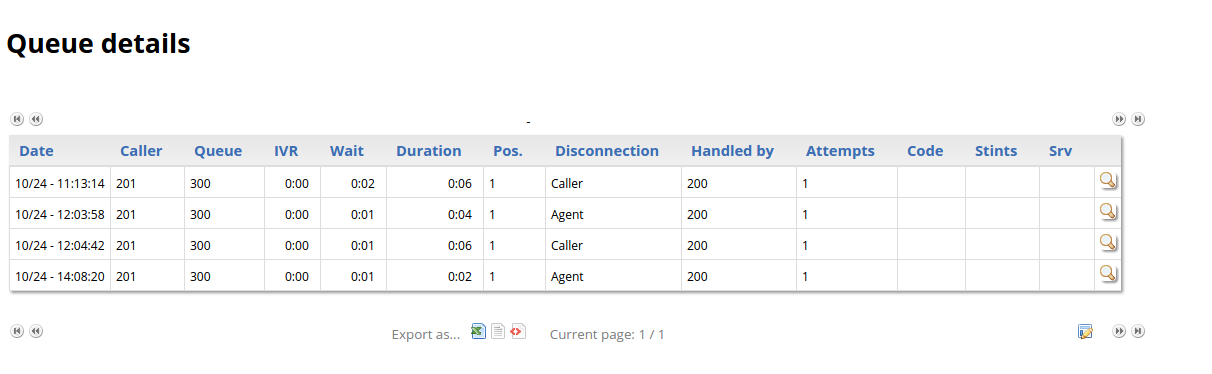
Clicking on the Call Detail Icon (the magnifying glass icon on the right), will show at the bottom that QueueMetrics retrieves the recordings related to that call’s Call ID (Asterisk Unique Call ID).
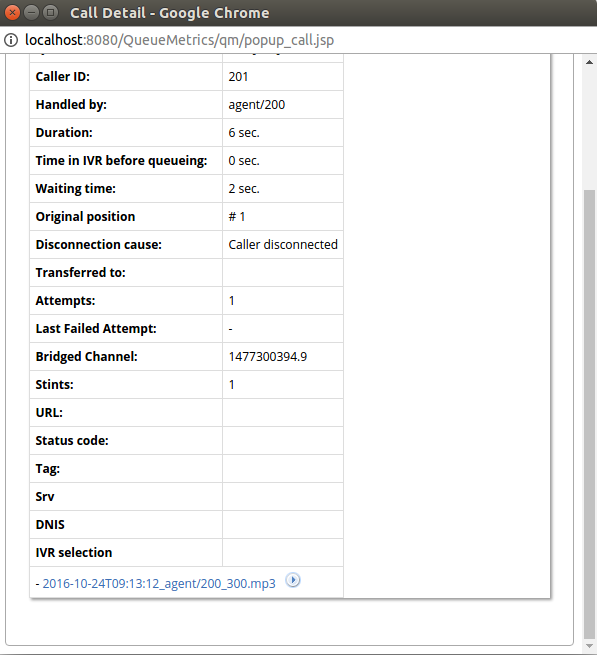
The name format QueueMetrics uses to represent a recording is the following:
DateTime_agent_queue.mp3
Clicking on the Play icon just right of the recording name will stream the recording directly without downloading it.

To download it instead, one must click on the recording name.

Cluster Mode
If QueueMetrics is working in Cluster Mode, it can manage recordings stored on different CallCabinet Sites.
This is because Cluster Mode allows the user to define different System Parameters for different PBXs.
we can define properties specific to each PBX Server, by using the following syntax:
-
cluster.servername.callcabinet.customer_id=xxxx
-
cluster.servername.callcabinet.site_id=xxxx
-
cluster.servername.callcabinet.api_key=xxxx
So, by using the prefix “cluster.ServerName.SystemParameter”, where ServerName is the name of the PBX (as defined in the cluster.servers system parameter) and SystemParameter is the name of the System Property to be set (e.g. “default.callcabinet.site_id”), without the “default.” prefix, we can allow the same properties to have different values depending on the server we are currently monitoring.