Notes on integration
Call tracking
Generally, no configuration changes to your tenant are necessary for calls to be tracked. However, there are cases where small modifications can have a positive impact.
Tracking multiple queues (CQs)
What QueueMetrics tracks is not so much the queue or auto attendant itself, but the resource account associated with them. Therefore, if multiple queues share the same resource account, they may appear as the same queue in reports - though they appear as different queues in Teams. This sometimes happens when using nested queues where calls transit through multiple queues before reaching an operator. In this case, the solution is to use a different resource account for each queue.
| Always use a dedicated resource account for each separate entity you want tracked, to avoid confusion. |
Tracking auto attendants (AAs)
The same issue with resource accounts occurs with Auto Attendants; however, there is an additional difficulty because (as of September 2025), when there are multiple attendants that are nested, even when different resource accounts are used, MS Graph transmits all activity as if it were performed on the first attendant, and QueueMetrics conflates it together as one single attendant. This is a known defect in Graph awaiting resolution.
| You can check the latest updates to the Graph API via https://developer.microsoft.com/en-us/graph/changelog |
In general, Graph does not transmit the key that was pressed to make a selection in the auto-attendant, but you can see which branch was taken by analyzing where the call ends up. Whenever a key is implied, it appears in QueueMetrics as if the key x was pressed.
Understanding reports
Direct calls vs Outbound calls
Direct calls are inbound, that is, go to a user that is a member of this tenant. They are actually tracked on two separate queues:
-
Direct taken calls (
_DIRECTor_CONF) -
Direct lost calls (
_DIR_LSTor_CONf_LST): as lost calls do not have an answeree, the variable_DIRECT_TOis set to the original destination of the call.
Outbound calls are "going out", that is go either to the PSTN or to another tenant. They are reversed, that is, the agent is actually the originator of the call.
Understanding call direction
QueueMetrics tracks all calls, both inbound and outbound, as if they were made on a queue. Therefore, the caller is the entity that initiates the call and the agent is the one who answers. In some cases these roles are reversed:
-
Outbound taken calls
-
Outbound lost calls
For Conferences, the "agent" is the organizer, while all other participants are set as attributes on the call:
-
SESis a Teams session -
WEBis a web session -
PHOis a participant joining from their phone -
OTHare other sessions
For voicemails, the "agent" is the destination voicemail.
Multi-stint calls
When a call traverses multiple queues, or is transferred between different operators, it is divided into multiple parts (stints). When viewing the call details, it shows whether the call has other stints, because you can see:
-
Variable "N. Stints": where you are in the call history. If it says "2/3" it means that you are watching the second stint out of three.
-
Variables "Prev Stint" and "Next Stint": where the call was in the previous and successive stint. The subject may be a queue, an auto attendant or a user.
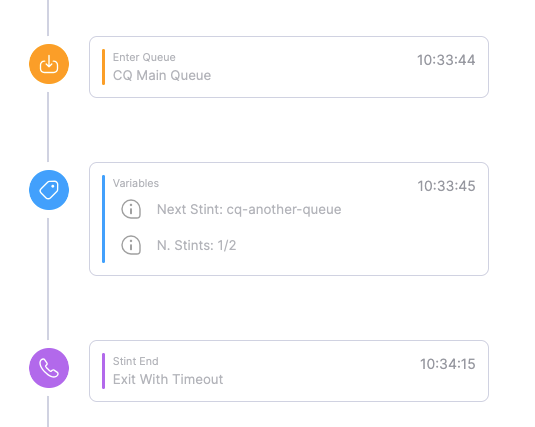
By enabling multi-stint mode in reports, and including in the report all queues that the call traversed, you can see a continuous history of the call up to its resolution.
Different kinds of users
-
Normal users in the tenant are identified with their own name. When you run an automatic configuration, they are loaded in the agents table in QueueMetrics so that they appear with the exact same name as shown in Teams.
-
Guest users, that is users belonging to a different tenant but "adopted" into the current tenant, appear with their name followed by the
EXTmoniker. They are counted as normal users, as they work in your team "as if" they were native. -
External users, belonging to different tenants and calling directly through Teams. They won’t be decoded and will appear as
Teams/username@tenant. They are not counted as agents even when they appear in the "Agent" field. -
Web sessions. Those users use web clients to join Teams meetings and do not have a proper Teams identity. They appear with a unique code as
Teams/abcdef123 -
External PSTN phones. They appear as
Agent/+1234578orTeams/+12345678.